 TaxYearSheets
Short answer
Our UK Sole Trader MTD Record-Keeping Kit 2026/27 (£19.99) is a one-off Excel (.xlsx) and Google Sheets workbook for self-employed sole traders and freelancers. You log sales, expenses, business mileage and home-working hours once; the workbook totals your cumulative quarterly MTD figures across HMRC's SA103F categories and keeps year-end simplified expenses separate until your annual return. Record-keeping only; does not submit directly to HMRC.
Last checked against GOV.UK: 23 October 2026. Sources are linked in each section. HMRC updates its guidance, so always check the source before you act.
The problem self-employed sole traders face under Making Tax Digital
Under HMRC's Making Tax Digital for Income Tax rules, sole traders with qualifying gross income over £50,000 (from 6 April 2026, based on 2024/25) or over £30,000 (from 6 April 2027, based on 2025/26; £20,000 from 6 April 2028) must keep digital records of every business income and expense transaction and send four cumulative quarterly updates a year.
- SA103F categories vs simplified expenses: HMRC's quarterly updates follow the Self Assessment self-employment categories (SA103F boxes 15–30), while flat-rate business mileage (55p/25p per mile in 2026/27) and flat-rate working-from-home hours (£10/£18/£26 per month) are simplified-expense adjustments you review before finalising your annual return (GOV.UK).
- Disallowable and capital items must not leak into allowable expenses: client entertaining (box 24, tracked separately from allowable advertising), capital equipment purchases and personal drawings need to be recorded clearly without inflating your deductible expenses.
- Cumulative year-to-date quarters & the 1–5 April boundary: each quarterly update reports cumulative totals from 6 April (or from 1 April if your accounting year runs 1 April–31 March and you elect calendar quarters in software before sending Update 1) to the end of that quarter. If your 2025/26 Self Assessment return ran to 5 April 2026, transactions dated 1–5 April 2026 belong to 2025/26 and must not be entered into your 2026/27 workbook.
Check when MTD applies to you in our free Making Tax Digital deadline checker, or test a vehicle claim in our free 2026/27 mileage allowance calculator.
See the finished result (fictional sample data)
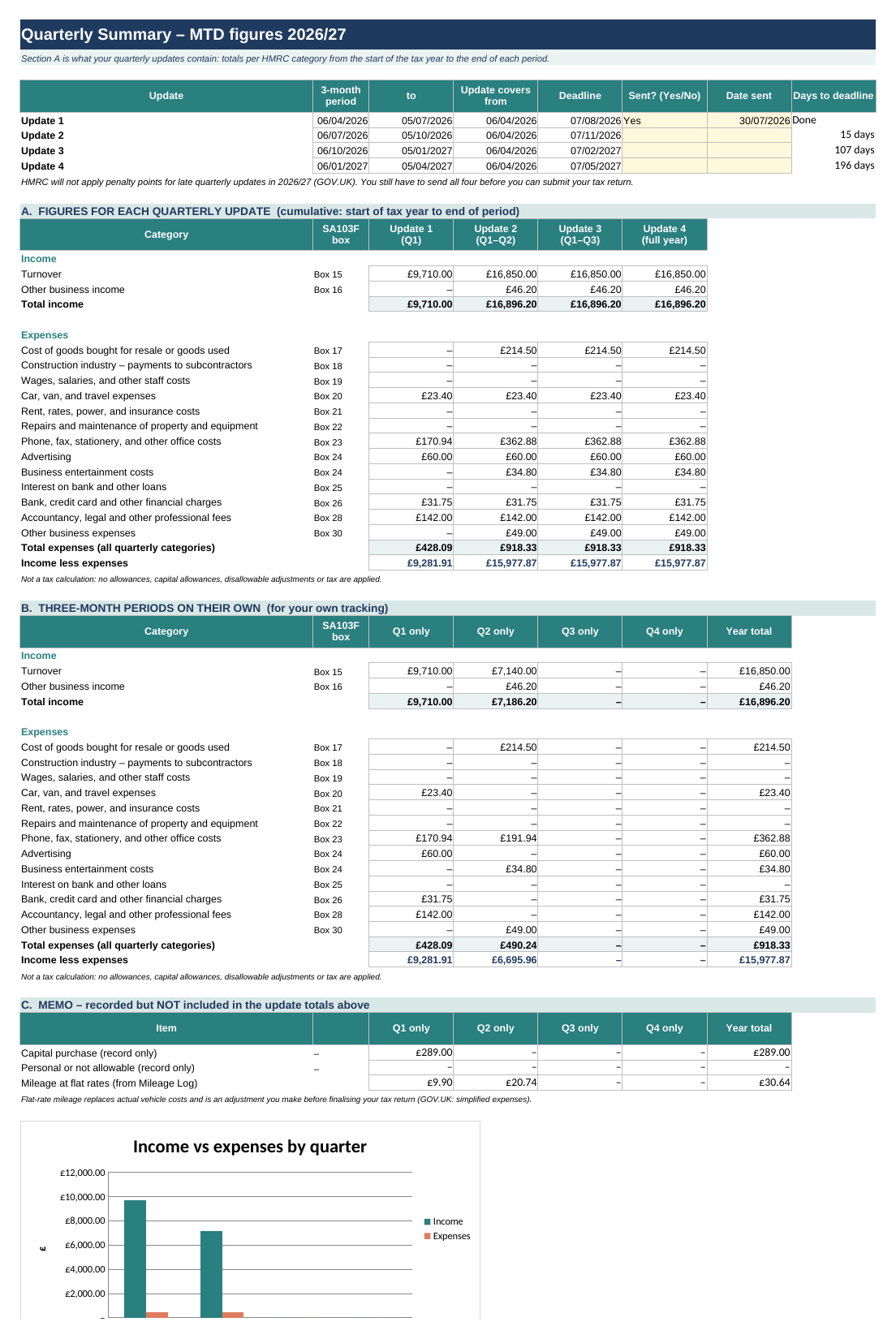
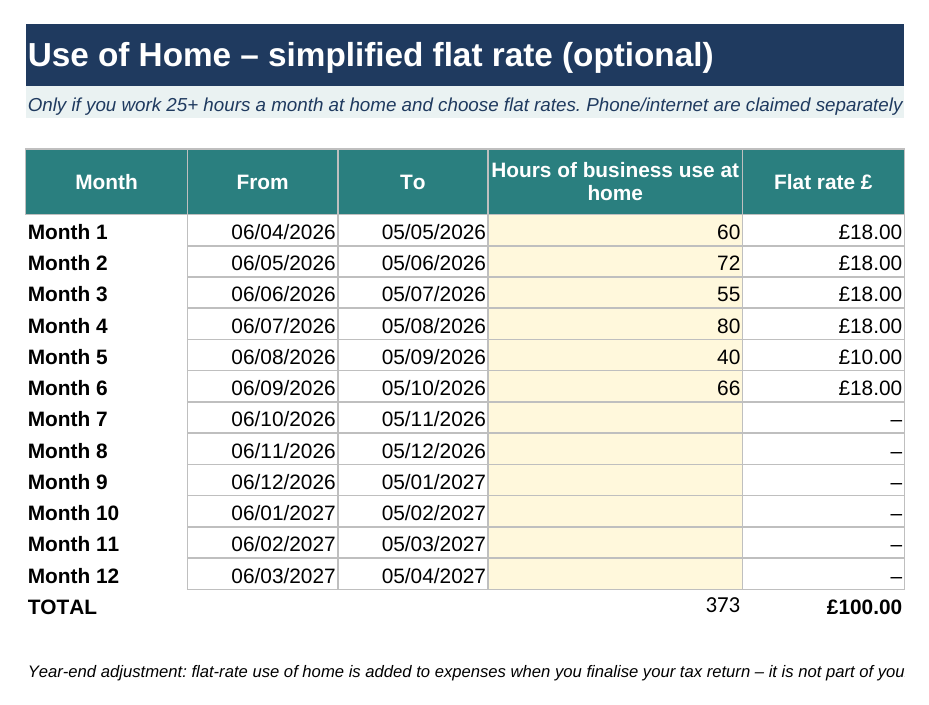
Below are actual screenshots from our UK Sole Trader MTD Record-Keeping Kit 2026/27 populated with fictional sample transactions only (an imaginary freelance design and consulting business in Q1–Q2 2026/27). Select either image to open the full-resolution PNG in a new tab on mobile.
What this spreadsheet does – and what it does not do
Record-keeping only; does not submit directly to HMRC. We do not promise tax savings, guaranteed time saved, or universal MTD compliance from buying a spreadsheet alone.
What this kit DOES
- Records date, amount, client/supplier description and HMRC SA103F category for up to 500 income rows and 500 expense rows in 2026/27.
- Supports both standard tax-year quarters (from 6 April) and calendar quarters (from 1 April) via a single Settings dropdown, plus HMRC's under-£90,000 two-total expense consolidation view.
- Calculates 2026/27 flat-rate business mileage automatically across up to 500 journeys (55p per mile for the first 10,000 car/van miles, 25p thereafter; 24p for motorcycles; 20p for cycles).
- Calculates optional flat-rate working-from-home expenses across all 12 months and compares your total expenses against the £1,000 trading allowance on the Annual Summary tab.
What this kit DOES NOT do
- Record-keeping only; does not submit directly to HMRC. Spreadsheets cannot send updates to HMRC's API by themselves.
- Does not replace MTD bridging or filing software (you still need HMRC-recognised software to send quarterly updates and your Final Declaration).
- Does not calculate your total personal Income Tax or Class 4 National Insurance bill across other income sources (PAYE employment, pensions, dividends or student loans).
- Does not handle VAT returns (MTD for VAT), CIS contractor monthly returns, partnerships (SA800) or limited companies.
- Negative cumulative category limitation: individual refund or credit-note rows reduce a category's cumulative total while it stays at £0.00 or above, but HMRC's MTD API and bridging templates reject net-negative category totals (
< £0.00). If a credit note or refund makes an entire SA103F category negative for the year to date, export for that box is blocked (CHECK (<0)) until you review or adjust the entry.
What's inside the UK Sole Trader MTD Record-Keeping Kit (£19.99)
The workbook contains 10 unlocked worksheets with formula protection hints, dropdown validation and zero macros:
| Worksheet tab | What it records or calculates |
|---|---|
| 1. Start Here | Setup checklist, colour key (pale yellow = your inputs; white/grey = automatic formulas) and links to official GOV.UK guidance. |
| 2. Settings | Business name, accounting basis (cash basis is the default for most sole traders), update period type (Standard 6 April vs Calendar 1 April), and under-£90,000 consolidated expense toggle. |
| 3. Income Log | 500-row digital log for Turnover (box 15) and Other business income (box 16), with automatic quarter assignment and uncategorised-row warnings. |
| 4. Expense Log | 500-row digital log mapped to all 13 HMRC self-employment expense categories (SA103F boxes 17–30, including Bank, credit card and other financial charges in box 26), plus separate tags for capital purchases and personal/non-allowable items. |
| 5. Mileage Log | 500-row journey log (date, from/to, vehicle type, business miles) that automatically applies HMRC's 2026/27 55p / 25p car and van threshold and 24p motorcycle rate. |
| 6. Quarterly Summary | Update 1–4 deadline tracker, Section A cumulative MTD figures mapped to SA103F boxes, Section B discrete 3-month figures, and Section C memo items (capital purchases, personal items and flat-rate mileage). |
| 7. Monthly Summary | Month-by-month breakdown of turnover, allowable expenses and net profit from April 2026 to March 2027. |
| 8. Use of Home | 12-month log for HMRC's simplified flat-rate home-working scale (£10 / £18 / £26 per month when working 25+ hours a month at home). |
| 9. Annual Summary | Full-year SA103F summary combining logged expenses with optional simplified mileage and home-working adjustments, plus a side-by-side comparison with the £1,000 trading allowance. |
| 10. Lists | Reference table of HMRC self-employment categories and SA103F box numbers used by the dropdown menus. |
Also have rental property, or only a small side hustle?
If you have both self-employed income and UK rental property, our UK MTD Spreadsheet Bundle (£29.99) includes both the Sole Trader and Landlord MTD kits. If you only sell online casually (on Etsy, eBay, Vinted or Depop) and want to separate personal clear-out sales from taxable trading and check the £1,000 trading allowance, see our UK Side Hustle & Online Seller Tax Records Kit (£12.99).
Questions
What file format do I get, and how is it delivered?
You receive an instant digital download immediately after checkout containing the unlocked .xlsx spreadsheet workbook (no macros or VBA) and a PDF Quick-Start Guide with a one-click link to copy the workbook into a free Google Sheets account.
Which spreadsheet programs and devices are supported?
The workbook works in Microsoft Excel (2016, 2019, 2021 and Microsoft 365 on Windows and Mac), free Google Sheets in any modern browser, and LibreOffice Calc.
Does this spreadsheet submit my quarterly updates to HMRC?
No. This kit is for record-keeping only; it does not submit directly to HMRC. If you are required to use Making Tax Digital for Income Tax, you must use HMRC-recognised bridging or filing software to send your quarterly updates and Final Declaration. See our MTD filing and bridging software guide.
Will I have to pay separate software fees to file with HMRC?
Possibly. Buying our workbook is a one-off payment (£19.99) for the spreadsheet itself. Bridging and filing software is provided by third-party vendors listed on GOV.UK: some offer free tiers for quarterly updates, while others charge monthly or annual fees or restrict free plans at year-end. Check our software explainer and the official GOV.UK software finder before choosing a filing tool.
What is your refund and cancellation policy for digital downloads?
Under Regulation 37 of the UK Consumer Contracts (Information, Cancellation and Additional Charges) Regulations 2013, you have a 14-day statutory cancellation period for digital downloads. You only lose that 14-day right to cancel before the 14 days expire if you start downloading or copying the files after giving explicit prior consent to immediate supply and acknowledging that your right to cancel will be lost once the download begins (where those consent and acknowledgment steps are not completed, or before downloading starts, the 14-day cancellation right remains). Separate from cancellation rights, under the Consumer Rights Act 2015 (sections 34–37), digital content must be of satisfactory quality, fit for purpose and as described – if a file is faulty or does not match its description, email [email protected] for a repair, replacement or refund.
What if I have more than one self-employed trade or also let UK property?
Under Making Tax Digital, each separate self-employed trade has its own quarterly updates. Because you own the unlocked file, you can save a separate copy of this workbook for each trade. If you also have UK rental property (which uses SA105 categories), see our UK MTD Spreadsheet Bundle (£29.99) below.
How do I get support if I have a question about the workbook?
Email [email protected] if you need help downloading, opening or using the spreadsheet formulas. We cannot provide personal tax, legal or accounting advice.
About TaxYearSheets: what we do and don't do
What we do: UK record-keeping spreadsheets (Excel and Google Sheets) and free browser-based checkers for landlords, sole traders and online sellers. Every date and rate is sourced to GOV.UK or legislation.gov.uk.
What we don't do: we're not HMRC software and we're not connected to HMRC. Our spreadsheets don't submit anything to HMRC; if you're in Making Tax Digital you still need software that works with it. Nothing here is personal tax advice. More about us.
Free UK tax deadline reminders
A short email 1–3 weeks before key UK tax dates: Making Tax Digital quarterly updates, the 31 January Self Assessment deadline and the end of the tax year. Each one says what's due and who it applies to, and links to the GOV.UK source.
- How often: about once a month, never more than 2 a month.
- What else: occasionally a note about our record-keeping spreadsheets. No spam, and we never share or sell your address.
- Leave any time: there's an unsubscribe link in every email.